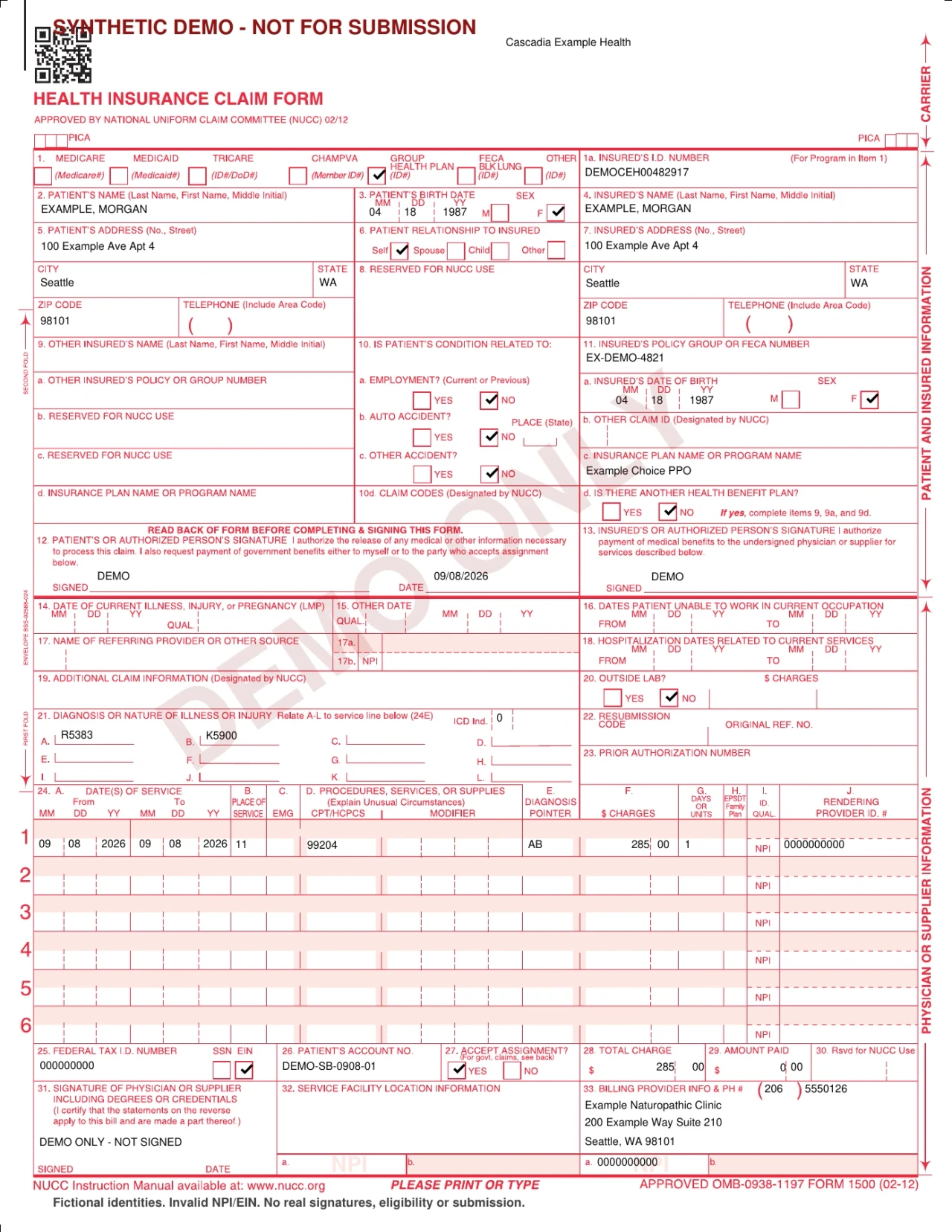
Oli can generate a CMS-1500 PDF from superbill data. Instead of opening a blank form and copying information across, your clinic can use the patient, insurance, provider, and service details already brought together in the superbill.
That matters because preparing a form is often repeat work. The information exists in the billing record, but someone still has to transfer it into a separate document. Oli handles the mapped fields so staff can spend less attention on transcription and more on checking the result.
CMS-1500 generation supports the applicable US billing workflow. Availability depends on the practice and record's regional form eligibility; it is not offered in every deployment.
Can Oli generate a CMS-1500 form automatically?
Yes. Where CMS-1500 export is available, Oli generates a PDF using the patient, insured, insurance, provider, and service information in a superbill. Staff initiate the export and review the result. Automatic population reduces repeated entry; it does not mean every field is completed or that review is unnecessary.
Use the information already in the superbill
Oli's renderer transfers supported patient and insured demographics, insurance identifiers, provider identifiers, and service information into the CMS-1500 layout. The superbill is the source for generation, rather than a document staff must read while rebuilding the same information elsewhere.
Structured information is useful beyond the form itself. On the clinical side, the Diagnosis block keeps problems organized. Billing staff still need to review the information appropriate to the superbill; a structured record does not replace that decision.
Where clinics save time
Less repeated typing
Patient and insurance details, provider identifiers, and service information do not need to be copied one field at a time into a blank PDF when Oli can populate them from the superbill. Missing or outdated source information still needs attention, but information already available does not have to be entered again simply to produce the form.
No separate form setup for the mapped fields
The built-in export means staff do not need an external form tool or a custom mapping template to generate the supported CMS-1500 fields. They work from the superbill rather than preparing a separate document and deciding where each piece of billing information belongs.
Less switching between tools
Generating from the billing record reduces the back-and-forth between that record and a separate form editor. Staff can move from checking source information to reviewing a populated PDF, rather than repeatedly finding, copying, and placing individual values. Comparing the result with the source remains part of review.
Fewer opportunities for transcription mistakes
Every manual transfer is another opportunity to mistype an identifier or omit information. Reusing source data reduces those opportunities and the avoidable correction work they can create. It does not correct inaccurate source data or make a claim denial-proof.
More attention for exceptions and people
Clinicians and billing staff can focus on missing information, unusual requirements, and final review instead of routine transcription. The same reduction in repeated work applies each time a form is generated across the workday. Staff time can go toward patient questions and billing follow-up rather than copying fields.
How does Oli's CMS-1500 generation save clinics time?
Oli reuses superbill data to populate supported CMS-1500 fields, reducing retyping, separate form setup, and switching between tools. Fewer manual transfers also mean fewer opportunities for transcription mistakes and avoidable corrections. Time saved depends on the clinic's existing workflow and source-data completeness; there is no fixed time-saving metric.
Generate the PDF in a few steps
- Open the patient's billing area.
- Create or open the relevant superbill.
- Review the source patient, insurance, provider, and service information.
- Choose Export CMS-1500 where available.
- Review the generated PDF and download it for the next billing step.
For teams assessing software, this is a practical workflow to include in a demonstration. Our guide to choosing an EHR for a solo practice helps frame that evaluation around the work your clinic actually does.
Keep review, reduce transcription
Check that the populated details are accurate and complete for the intended use. Some fields are not mapped automatically, and payer-specific requirements may need additional attention. Confirm that required signatures and authorizations are legitimately held or obtained; text printed on a PDF does not establish either.
PDF generation is separate from electronic insurer submission and coverage approval. Exporting the document does not transmit a claim to an insurer or guarantee acceptance or reimbursement. Use the payer's accepted submission process after review.
Does generating a CMS-1500 PDF in Oli submit it to an insurer?
No. Generating a CMS-1500 PDF prepares a document for review and the next billing step. It is not electronic insurer submission, coverage approval, or a payment guarantee. The clinic remains responsible for reviewing the form and following the payer's submission requirements.
Want to see how CMS-1500 generation fits your clinic's billing workflow? Ask for an Oli walkthrough and review the path from superbill to PDF with your team's requirements in mind.