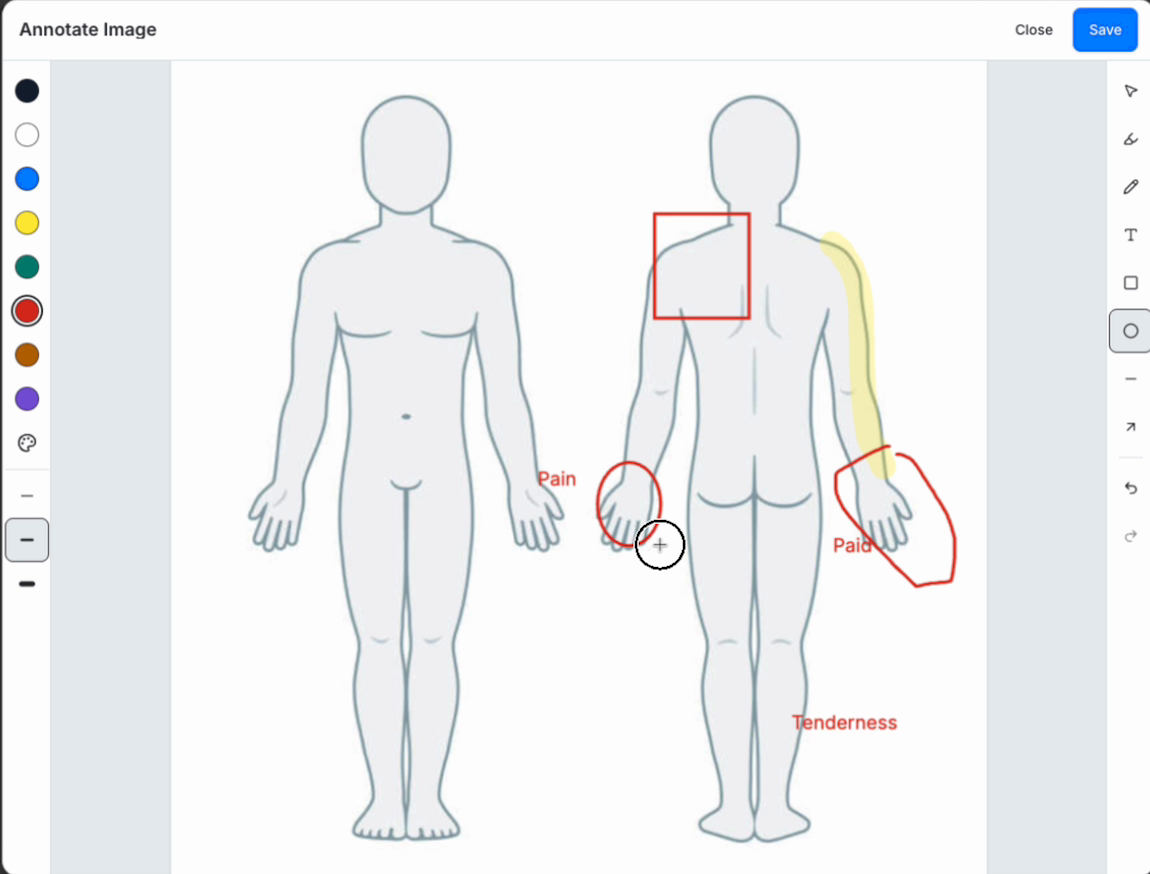
Pain in the hand. Tenderness in the leg. That shoulder spot a patient keeps pointing to. A good note can describe all three, and it should. The exact place the patient pointed can still be hard to reconstruct weeks later. Image annotation in charting puts that location on a body diagram, with the clinical explanation beside it.
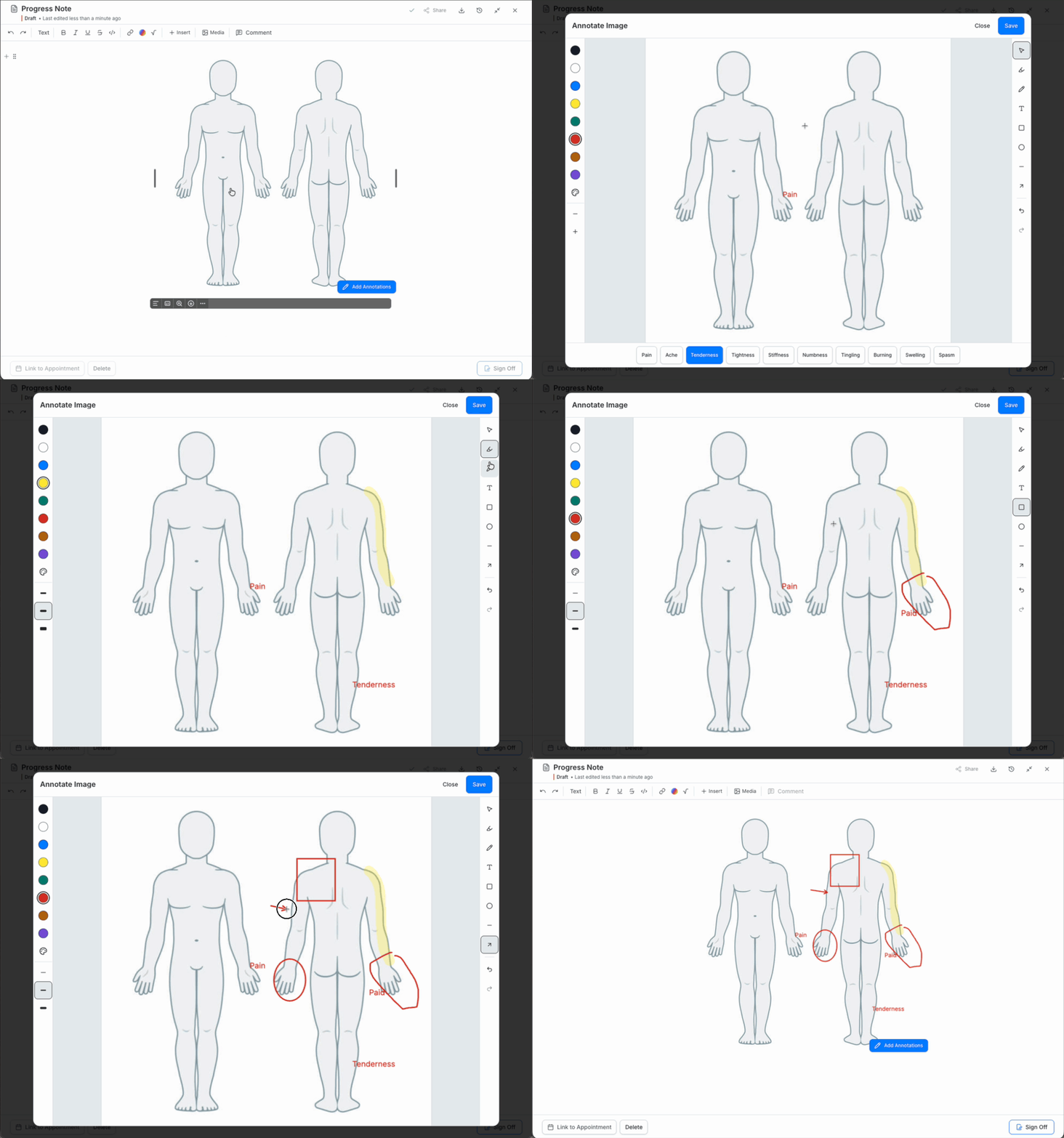
In this short demo, a generic body diagram starts as an image block in a progress note. Watch sample labels and marks go onto the diagram, then see the annotated image return to the note. The marks are examples, not patient data.
Where a Body Diagram Earns Its Place
A circle over the hand gives you a location. The note adds what the patient reported, what you observed, and what you plan to review next. When you reopen the chart weeks later, you can see the spot and the clinical context together.
The picture works best when the words and marks agree. A label can identify the area discussed; a highlighter can show its extent. The diagram stays easy to scan, while the written note carries the meaning.
What Is Image Annotation in Charting?
Image annotation in charting means drawing, labelling, highlighting, or adding text and shapes to an image in the patient record. In Oli Health, clinicians can annotate a saved image block in a chart note and keep it beside their written findings. They can also include an image block in a reusable note template or an active patient form.
Start With an Image Block, Then Reuse It
In an Oli Health chart note, type /image and upload a static body diagram. You can resize it in the note. Select Add Annotations at the lower right of the image block, or choose Annotate from its menu. The editor has freehand drawing, text, a highlighter, shapes, lines, arrows, and quick labels such as Pain and Tenderness. Put a mark where it belongs, adjust it, then save.
The marks stay with the image in the note. Need to move a label later? Reopen Add Annotations and adjust it.
If you use that diagram often, put the image block in a note template. Each insertion gets its own copy, so the circle you draw for today's visit does not appear in tomorrow's chart or change the template. The template is the reusable home for the diagram; there is no separate uploaded-image library in this workflow.
Can You Reuse an Annotated Image in an EHR Template?
Yes. Add an uploaded body diagram to an Oli Health note template and annotate the template if your practice uses the same starting marks. Each time you insert the template into a chart note, the image is a separate copy for that visit. Marks you add to the note do not change the template image.
Let Patients Mark the Image Before the Visit
The image block can also go in an intake or consent form. When a patient opens an active form, they can select Add Annotations, mark the spot they want to discuss, and save that image with their response. When you review the form, the spot is already visible. You can ask what they meant and record your findings in the note.
Each patient's marks remain with their own form response. The reusable form and everyone else's copy stay untouched. After submission, the image can be viewed without editing controls.
Can Patients Annotate an Image in an Intake Form?
Patients can annotate an image in an active Oli Health intake form. They select Add Annotations, mark the saved image, and save the marks with their response. The marks stay with that response and do not change the reusable form or another patient's copy. After submission, the annotated image remains visible without editing controls.
How Image Annotation Helps Each Specialty
The same image block can support different follow-up questions across a clinic. A naturopathic clinician might mark where a patient reported tenderness; an acupuncturist can keep a visual reference beside the treatment note. A massage therapist may circle an area to revisit after a session. A chiropractor can mark the region discussed, while a physiotherapist can note a body area to check as the exercise plan progresses. In each case, the image shows where; the written note records the finding and what comes next.
Can You Annotate Body Diagrams in a Naturopathic or Acupuncture EHR?
Yes. In Oli Health, naturopathic clinicians and acupuncturists can add a saved body diagram to a chart note, mark a discussed area, and keep the image beside their written findings. Massage therapists, chiropractors, and physiotherapists can use the same image block. A note template keeps the diagram ready to reuse, and each inserted copy can be marked for its own visit.
See Oli Health charting and try a body diagram in a note template.