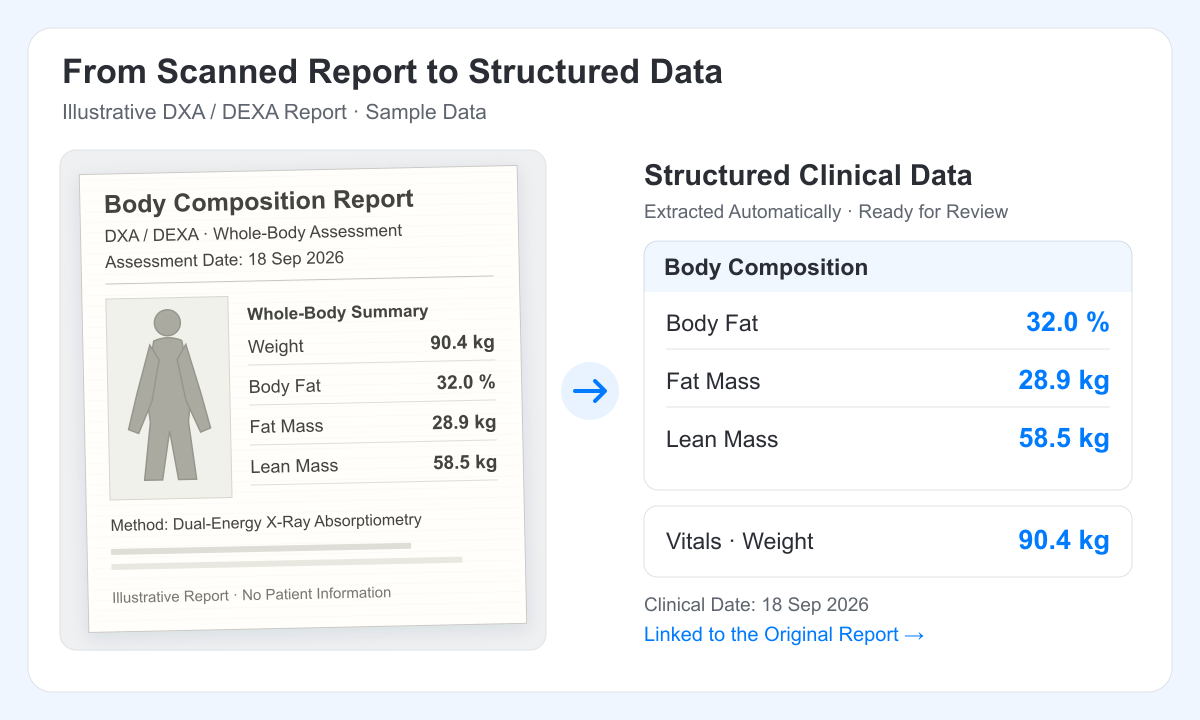
What changed since the last body composition report? For a nutrition, weight loss or wellness clinic, answering that question should be part of the conversation with the patient. It shouldn't require someone to find three attachments and copy their measurements into a spreadsheet first.
Oli Health brings automated data extraction to body composition tracking. When new reports arrive in the patient's record, Oli can extract the measurements into structured clinical blocks and bring dated results into Lens. Your team gets a history to work with, without retyping every report.
You get the benefit you want from an integration: measurements in the patient record, trends across visits and a link back to the original report. Oli works from readable machine reports, so your clinic can use that workflow across brands without arranging a custom integration with every manufacturer.
Your Reports Can Build the Follow-Up for You
A clinic may receive a DEXA body composition report, an InBody, TANITA or RENPHO printout, an uploaded PDF from another provider or a report sent by fax. Those files all belong to the same patient's story. With automation enabled, Oli processes new patient documents in the background, including incoming faxes once they're filed to the patient's record.
There's no separate extraction action for every new file. The measurements become editable clinical information, and dated body composition results can join the patient's trends alongside measurements recorded in the chart.
Oli brings the reported measurements into the Body Composition & Measurements block, with weight and height available through linked Vitals records. Your team can review the extracted blocks and make any edits in the patient record.
That gives a repeat assessment a longer useful life. A result received today can be part of the next visit's comparison, without someone rebuilding the history each time a new report arrives.
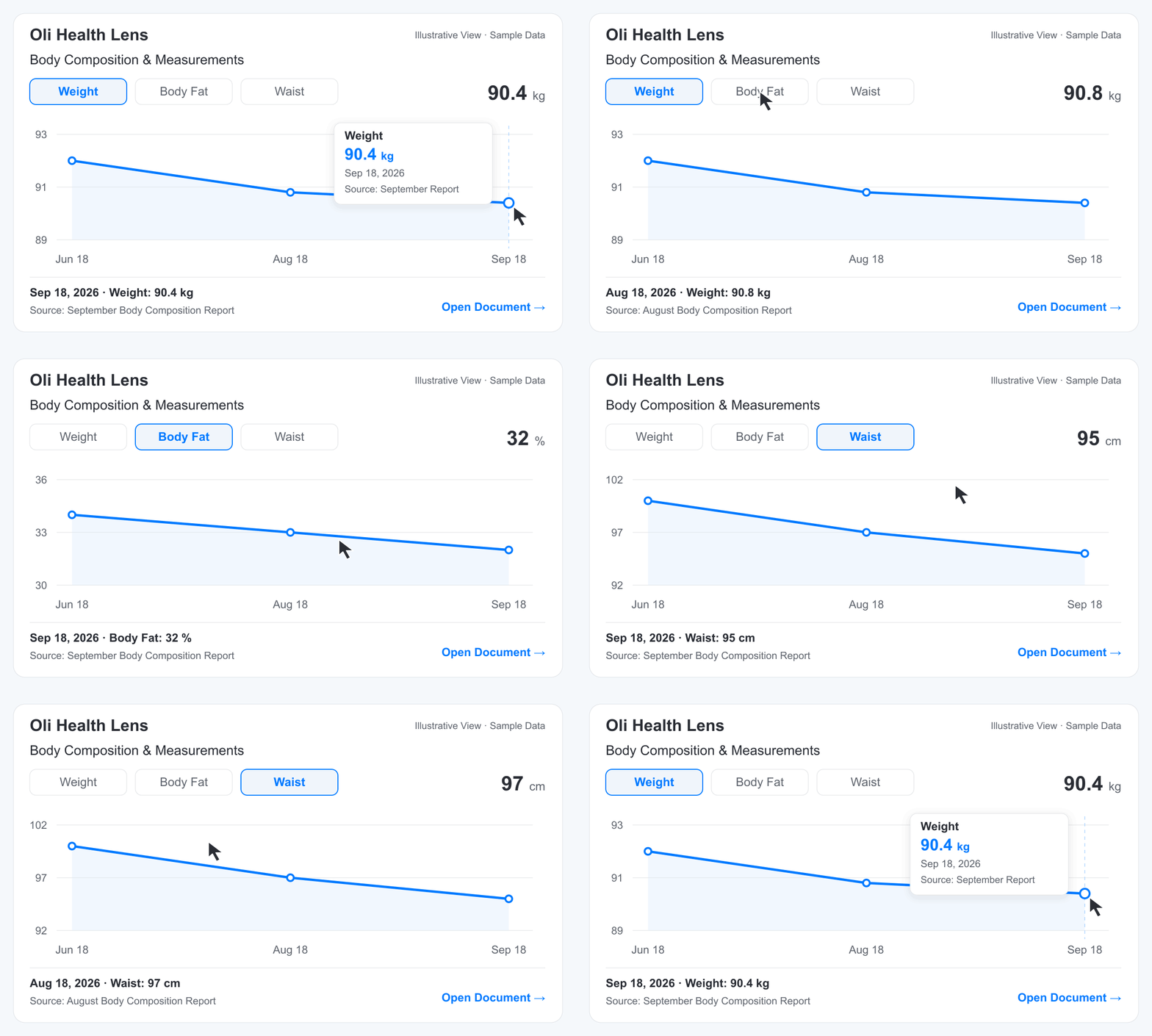
Can Oli Automatically Extract Body Composition Data From Reports?
Yes. With automation enabled, Oli Health extracts supported body composition measurements from new patient documents, including readable PDFs, scans, images and incoming faxes filed to the patient record. The measurements become editable clinical blocks. Dated results can appear in Lens trends, with links back to their source documents.
More of the Assessment, Ready to Track
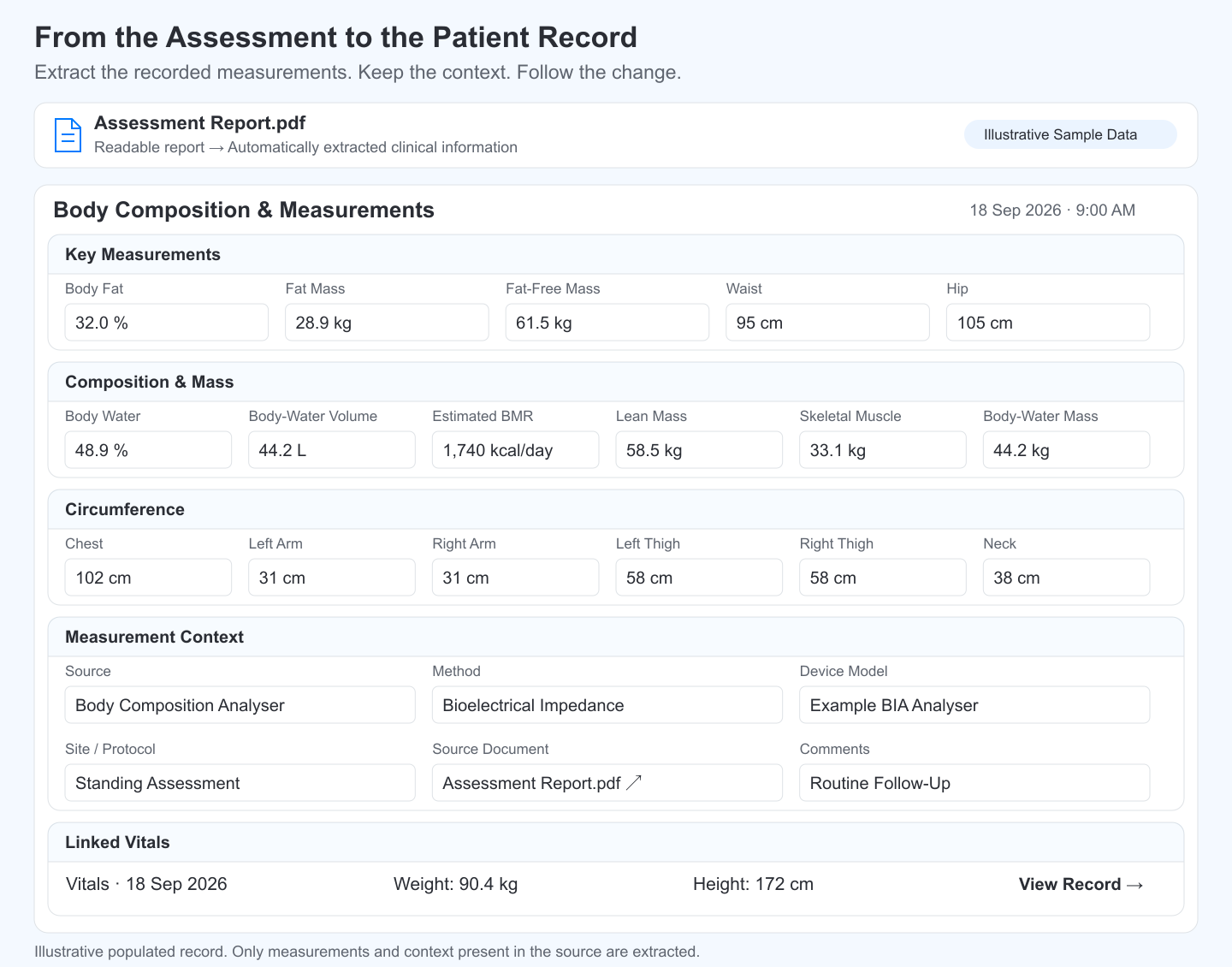
A body composition assessment tells you more than a patient's weight. Oli can extract the wider picture into the Body Composition & Measurements block, from fat and muscle measurements to hydration, estimated metabolic rate and body circumferences. The values go into their corresponding fields, with units and the assessment date, so your team can use them in the record and follow supported measurements over time.
The context belongs with the numbers, too. When it's included in the source, extraction can capture the assessment method, device and measurement protocol, while keeping the source document linked. Related weight and height measurements sit in linked Vitals records. Your team gets an organised assessment to review instead of a printout to retype.
Oli uses what's recorded in the report or clinical note. A report with a detailed assessment can populate a richer record; a shorter report fills the fields it contains. Measurements from documents and AI Scribe notes join the same patient history, giving nutrition, weight loss and wellness teams more to work with at the next follow-up.
Any Machine, One Report Workflow
If you can read it, so can Oli. Whether your clinic receives a DEXA scan report, an InBody result sheet, a TANITA printout, a RENPHO body composition report or a report from another analyser, the starting point is the same: add the document to the patient's record and let Oli extract the supported measurements.
There's no need to arrange a separate device connection each time a patient uses a different assessment service or your clinic changes equipment. Your reports become part of one patient history, with the original documents kept close to the trends.
DEXA, InBody, TANITA and RENPHO Models Clinics May Encounter
- DEXA / DXA: Hologic Horizon, GE Lunar iDXA and Lunar Prodigy. Systems such as Hologic Horizon, GE HealthCare Lunar iDXA and Lunar Prodigy provide body composition assessments with fat and lean-tissue measurements. Your team can use the recorded findings alongside the rest of the patient history.
- InBody: 270, 570, 770, 270S and 770S. Your clinic may receive reports from an InBody 270, 570 or 770, or a newer InBody 270S or 770S. InBody result sheets report BIA measurements such as body fat and skeletal-muscle mass, giving your team results to follow across visits.
- TANITA: MC-780 and MC-980 Series. The TANITA MC-780 and MC-980 series are professional BIA analysers. Their reports can contribute recorded body composition measurements to an ongoing nutrition, fitness or wellness programme.
- RENPHO: MorphoScan, MorphoScan Nova and Elis 1. MorphoScan and MorphoScan Nova offer printable body composition reports with fat, muscle and body-water measurements. The Elis 1 Smart Body Scale, described by RENPHO as a bestseller, tracks core body composition measurements in the RENPHO Health app. Add a readable report or clear image of the results to the patient's record, and Oli can bring supported measurements into the same source-linked history.
These are examples of the machine names your team may see on a report. The same workflow starts with a readable report from any brand: a PDF, a scanned printout or a clear image. Oli brings supported, explicitly reported measurements into structured fields, with the assessment method, device terms and source document available for the next comparison.
Can Oli Extract Measurements From a DEXA Report?
Oli can extract supported body composition measurements explicitly reported in a readable DEXA or DXA report added to the patient record. Values such as reported body fat, fat mass and lean mass become editable clinical data. Dated measurements can appear in Lens with links back to the report.
A Better Conversation About Progress
A follow-up is more useful when the record can show more than the latest weight. Your team may want to discuss how waist measurements have changed, compare reported body fat across assessments or look at a reported muscle measurement alongside the rest of the history. The relevant measures will depend on the patient's goals and the assessments your clinic uses.
Lens lets you select up to four measurements on the Body Composition & Measurements chart. You can adjust the date range, display units and baseline, then explore a point to see its change from the previous measurement and the baseline. Weight and body fat are selected by default when available.
For the practitioner, that puts the comparison within reach during the appointment. For the patient, it gives you something concrete to discuss: which measurements changed, which stayed similar and what questions are worth exploring together. You don't have to turn away from the conversation to reconstruct the record.
A New Report Arrives
Oli extracts the recorded measurements from a new patient document or filed incoming fax when automation is enabled.
The History Builds
Dated measurements become available in Lens alongside the patient's existing body composition and vitals records.
The Next Visit Starts With Context
Open the trend, explore the change and return to the original report when you need the detail behind a result.
How Does Body Composition Tracking Help a Weight Loss Clinic?
Body composition tracking helps a weight loss clinic compare recorded measurements across visits instead of relying on the latest weight alone. In Oli Health, teams can explore dated measurements such as body fat, waist circumference and weight in Lens, then open the source report for context. This supports follow-up conversations without maintaining a separate tracking spreadsheet.
Built for Nutrition, Weight Loss and Wellness Teams
The same feature can solve a different problem depending on the kind of care your clinic provides.
Nutrition Clinics: Keep Assessments Close to the Plan
Nutrition care often brings together information from several places. A patient may attend a body composition assessment elsewhere, upload the report and discuss it at their next nutrition appointment.
For a practice working this way, extraction reduces the copying between the assessment report and the clinical record. A dietitian can open the recorded history before the consultation and use the appointment to discuss it alongside the nutrition plan, symptoms and the patient's own experience.
Weight Loss Clinics: Bring Repeat Measurements Into Follow-Ups
Medical weight-management programmes may combine nutrition support, medication reviews and repeat measurements.
Oli helps bring the reporting side of that workflow together. Your team can follow body composition measurements over time, keep the original reports accessible and use the wider patient record for the rest of the visit. Our guide to the medication list covers another part of that longitudinal record.
Wellness Clinics: Make Continuity Easier Across Appointments
eFit Bermuda uses Oli Health to automate charting with AI Scribe and data extraction, cutting down the admin work around appointments. AI Scribe helps turn consultations into chart notes, while data extraction brings information from documents into structured patient records.
For Myra, eFit Bermuda's owner and practitioner, that means more time with clients and an easier way to help them follow their progress:
We started to use Oli Health 2 months ago and it has been a game changer.
Not only does it allow our busy nutrition clinic to spend more time with our clients - it also allows the clients to directly receive updated progress graphs and simple personalised actionable items to keep them on track. This means better results do to increased engagement.
My only regret? I did not know about Oli Health sooner.
 Myra Dill
Practice Owner and Practitioner, eFit Bermuda
Myra Dill
Practice Owner and Practitioner, eFit Bermuda
AI Scribe and data extraction stay in sync, bringing measurements from documents and clinical notes into one unified trend line in Lens. Each result stays linked to its source, so your team can follow progress across visits without piecing the history together.
For wellness clinics tracking body composition, automatic extraction can make a new measurement report available in the record between visits without another round of manual entry. At the next appointment, the practitioner can pick up the history in Lens and spend more time talking about the patient's goals, routines and next steps. The benefit is a more connected follow-up, whether the appointment happens in the clinic or online.
Keep the Report Behind Every Trend
A chart is easier to use when you can check where each point came from. In Lens, document-sourced entries retain a link to the corresponding document and clinical block. From there, you can open the original report, including its source page when available.
That connection also keeps measurement context close. A DEXA lean-tissue value and a BIA skeletal-muscle value are different measures; Oli's structured fields keep those terms distinct. For repeat BIA assessments, InBody recommends consistent testing conditions, including the same environment and time of day. Keeping the source report available helps your team make a considered comparison rather than treating every number as interchangeable.
Body composition trends use the clinical dates attached to the measurements. A report without a reliable clinical date can still have extracted information available in its document blocks, but undated body measurements do not appear as dated trend points.
The same extraction workflow also supports lab results, medications, diagnoses and vitals. If your clinic receives bloodwork alongside body composition assessments, our automated data extraction launch article shows how those documents fit into the wider record.
Can Oli Work With Reports From Any Body Composition Machine?
Yes. Oli works from readable body composition reports, including DEXA, InBody, TANITA and RENPHO reports, so the workflow is not tied to a particular machine brand. Add a PDF, scan or clear report image, and Oli extracts supported measurements into structured records and dated Lens trends. You get the benefit of connected data without setting up a separate device integration for each machine.
Start With the Next Report
A practice owner or admin can enable Auto-Refresh Before Appointments under Practice Settings → Oli AI → AI Overview. New patient documents, including incoming faxes filed to a patient, can then be processed automatically. Review the extracted measurements against the report and open Lens to explore the history.
See how automatic extraction and body composition trends could fit your clinic. Schedule a Demo Call for a walkthrough, or Get Started With Oli Health and let your next report become part of the next follow-up.